Bewerte und beschleunige die HMI-Entwicklung in der Unreal Engine mit der neuen Unreal Engine HMI-Vorlage und dem Datenreduktions-Pipeline-Plugin, die mit der UE 5.8 veröffentlicht werden.
Unreal Engine··1 min read
MobileRelease
Building Premium Android Experiences at Google I/O ‘26
Posted by Ataul Munim, Android Developer Relations Engineer A truly differentiated Android experience is about delivering premium delight wherever your users are. At Google I/O ‘26, we showcased how the latest advancements in the Android ecosystem can help you elevate your app's quality while maximizing development efficiency. To help you build apps that stand out, we're diving into the key tools and libraries designed to optimize your core performance, extend the surfaces of your app to other devices, and streamline how your app handles high-quality media. Here is a recap of the essential updates and sessions you need to know to deliver a next-level experience across form factors! Maximize app performance and ROI with the R8 Configuration Analyzer A premium experience is only as good as its foundation, and a performant foundation is what allows your app to scale across the Android ecosystem. This is especially true with the release of Android 17, which introduces conservative, device RAM-based app memory limits to target extreme memory leaks and outliers before they cause system-wide instability. To stay below these new system thresholds and prevent your app from being terminated, having a lean footprint is no longer optional: it’s a critical requirement. This year, we’re making it easier to build highly optimized, fast apps by introducing the R8 Configuration Analyzer in Android Studio. R8 is your most powerful tool for improving app performance, but its effectiveness is often limited by overly broad "keep rules" that prevent the compiler from stripping away unused code. The new Configuration Analyzer provides optimization, obfuscation, and shrinking scores, allowing you to identify specific rules that are preventing the benefits of R8 optimization. By optimizing their R8 configurations, developers at Monzo achieved a 30% improvement in cold starts and a 35% reduction in ANRs. Smaller, faster code isn't just about efficiency; it's about ensuring your app has the memory headroom to deliver delight on every form factor, from the phone to the car. Extend your reach with a unified approach to Widgets on Phones, Watches and Cars User interaction is shifting toward quick, glanceable moments—short bursts of information that keep users connected without needing to open the full app. To help you increase the reach of your app content, we are unifying the development experience across the Android ecosystem with Jetpack Glance. By using a consistent, Compose-based model, you can elevate the content most important to your users straight to the phone’s home screen, Wear Widgets (previously Tiles!), and cars with a familiar workflow. In order to help users engage with your content and features, even outside your app, we are making widgets more expressive and adaptive with RemoteCompose. On Wear OS, RemoteCompose allows you to use the Compose tools you’re already comfortable with to define UI logic that renders natively on remote surfaces, ensuring that your glanceable experiences remain highly performant and responsive even on resource-constrained hardware. On mobile and cars, RemoteCompose is used as a new framework giving Widgets new expressive capabilities. You can use Jetpack Glance (together with RemoteCompose on Wear) to deliver a cohesive user journey. Whether it’s viewing flight status on the car dashboard, checking a gate change on a watch, or managing a boarding pass from a phone widget, this shared approach maximizes your app’s presence while keeping your development effort focused and efficient. Supercharge your media pipeline with a complete, production-ready toolkit Android has become a world-class home for the entire media lifecycle, and we are simplifying the journey from the first capture to the final playback. By leveraging Jetpack CameraX and Media3, you can build professional-grade experiences that feel native across the entire ecosystem. It starts with high-fidelity capture using the CameraXViewfinder Composable, which ensures your preview remains perfectly scaled and responsive on any form factor, including foldables and tablets. Use this to build adaptive capture experiences like a picture-in-picture view for multi-tasking, or that take advantage of modern features like high-frame-rate or slow-motion capture with CameraX v1.5. The new Media3 AI Effects library will provide a unified interface for premium features like Image & Video Enhance, Magic Eraser, and Studio Sound. This allows you to focus on the creative intent while Media3 handles the heavy lifting of choosing the most efficient and reliable path for the device. Then, use the latest improvements in multi-asset editing with Media3 Transformer to composite your edited videos together! Complete the pipeline with tools designed for professional-grade export and viewing, including: CodecDB, which offers data-driven encoding recommendations tailored to specific chipsets, ensuring your exported videos maintain high visual quality with minimal noise or blurriness Scrubbing Mode in ExoPlayer to provide the buttery-smooth seeking experience users expect from premium media apps Enhanced Cast support with the new CastPlayer API in Media3 By unifying these technical pillars, you can build a cohesive, high-performance media journey that delivers both delight for your users and high ROI for your development team. For more details, check out the premium Android experience YouTube playlist .
Bei den Dev Days kommen Unreal Engine-Entwickler zusammen, um zu lernen, sich zu vernetzen und Ideen auszutauschen. Finde das nächste Event in deiner Nähe und entdecke neue kreative Möglichkeiten durch spannende Sitzungen, die von Epic-Sprechern und Teams aus der Branche geleitet werden.
As of July 20, the public can access data from the two powerful radar instruments aboard the NISAR (NASA-ISRO Synthetic Aperture Radar) satellite. Teams in the United States and India will release files processed from the satellite’s L-band and S-band radars on an ongoing basis, helping researchers and other users track the movement of Earth’s […]
Posted by Caren Chang, Developer Relations Engineer, Android Developer Relations Welcome back to the blog post series " Build intelligent Android apps " where we take a basic Android app and transform it into a personalized, intelligent, and agentic experience. In our previous post we introduced Jetpacker , the demo app we'll use throughout this series. In this blog post, we will share how you can use Gemini Nano through ML Kit’s Prompt API to build intelligent on-device features. Building intelligent on-device features refers to the ability to process prompts and data directly on a device without sending data to a server. This offers a few advantages: User data can be processed locally on the device, preserving user privacy Functionality of the model is reliable even with spotty or no internet connection No additional cloud inference cost , since everything runs on the user’s hardware With the benefits of on-device in mind, we identified three features to add in Jetpacker that can improve the user experience: summarizing trip itineraries, managing expenses, and capturing voice notes. On-device features in Jetpacker: Summarizing trip itineraries, managing expenses, and voice notes High quality tailored summarization of short texts The itinerary screen gives users a quick overview of all activities for a given trip. Since this screen contains a lot of information, it can quickly become overwhelming. To help users prepare without feeling overwhelmed, we can add a ‘ Get ready for your trip ’ section at the top. The romantic Paris trip is summarized as a classic Parisian adventure blending art, sights, and delicious food. A tip and some useful phrases are also added. By inputting a trip itinerary and asking an LLM to summarize it, we can generate a quick summary of the trip along with packing tips and useful local phrases. This is a great use case for an on-device model for several reasons: Performance and quality : Both the input and output text are relatively short. With that, we can expect the performance and quality of an on-device solution to be on par with more powerful cloud models. Scalability : Shifting inference on-device allows us to scale this feature from a few users to millions without worrying about managing increasing cloud inference costs. Low latency and reliability : On-device inference guarantees low latency, providing a reliable experience even when users are offline. To build with on-device, we use Gemini Nano , Google’s most efficient model optimized for mobile devices. Gemini Nano was first introduced a few years ago, and is now running on over 140 million devices. The latest version of the model, Gemini Nano 4, is built on the architecture foundation of the recently released Gemma 4 model , and is further optimized for maximum battery and performance efficiency. Using ML Kit’s Prompt API , we can take advantage of Gemini Nano 4’s new model capabilities to prototype our on-device features. We’ll create a prompt that includes the itinerary of a trip and ask the model to generate a summary along with any preparation tips. // implementation("com.google.mlkit:genai-prompt:1.0.0-beta3") // Define the configuration for Gemini Nano 4 E2B preview model val previewFastConfig = generationConfig { modelConfig = modelConfig { releaseStage = ModelReleaseStage.PREVIEW preference = ModelPreference.FAST } } val geminiNano2BPreviewModel = Generation.getClient(previewFastConfig) val tripItinerary = ... val getReadyForYourTripSummary = geminiNano2BPreviewModel .generateContent("Given this trip itinerary: $tripItinerary, generate the following: overall vibe, tips on how to prepare for this trip, and common short phrases to learn for the trip.") Finding the optimal prompt usually requires some iteration, and the AICore app is perfect for this step in the process. After opting into the developer preview option for AICore , we can download preview models such as Gemini Nano 4 to test prompts and see the model’s expected outputs. With a few iterations on the prompt, we were able to improve the speed of the response from 13 seconds to under 2 seconds! Check out the final code implementation and prompt here . The first iteration of our prompt generated way too many tokens, and optimizing it helped keep responses quick and to the point. Local processing for sensitive user input Next, to help users enjoy their trip even more, we’ll build a simple expense manager that takes the manual work out of sorting through receipts and calculating budgets. Taking a photo of a restaurant bill, data is parsed and shown in the expense overview screen of the app. Since receipts might contain sensitive information like credit card number and addresses, this is another great use case for an on-device solution. With on-device, users can be confident that private information will be processed locally on the device without any of their data being sent to the cloud. In addition, Gemini Nano 4 has improved model capabilities for multimodality, especially for image understanding tasks like OCR and visual data extraction, making it a great solution for tasks like extracting information from receipts. For this use case, the prompt will analyze an image of the receipt, and output information such as: a generated title, amount spent and category of the expense. To ensure the model outputs the information in the preferred format, we can use ML Kit’s Structured Output API to seamlessly output a Kotlin data object that we define. // implementation("com.google.mlkit:genai-prompt:1.0.0-beta3") // ksp("com.google.mlkit:genai-schema-compiler:1.0.0-alpha1") @Generable("Information extracted from an expense receipt") data class ParsedReceipt( @Guide("Generated title for the expense less than 6 words. Based on restaurant or activity name.") val title: String, @Guide("Total amount of the expense. Look for values at the bottom and words like total or balance due.") val amount: Double, @Guide("Type of expense", enumValues = ["travel", "food", "shopping", "entertainment", "other"]) val category: String, ) val prompt = "Determine if the image is a receipt or expense. If it is NOT a receipt or expense, output the text 'NOT_A_RECEIPT'. Otherwise, parse the receipt information." val request = generateContentRequest(ImagePart(bitmap), TextPart(prompt)) {} val requestWithStructuredOutput = generateTypedContentRequest(request, ParsedReceipt::class) // Define the configuration for Gemini Nano 4 E4B preview model // When selecting models, you can specify which performance charactertists are most important // for your use case. Use ModelPreference.FULL when you want to prioritize reasoning power over speed. // Use ModelPreference.FAST when complex logic is not required and latency is a priority. val previewFullConfig = generationConfig { modelConfig = modelConfig { releaseStage = ModelReleaseStage.PREVIEW preference = ModelPreference.FULL } } val geminiNano4BPreviewModel = Generation.getClient(previewFullConfig) val response = geminiNano4BPreviewModel.generateContent(requestWithStructuredOutput) val parsedReceipt: ParsedReceipt? = response.candidates.firstOrNull()?.response Multimodal input Lastly, to help users record audio memos during the trip, let’s build a fully on-device voice notes feature. Using ML Kit’s Speech Recognition API , we’ll enable users to record short voice notes that are automatically transcribed to text. With the transcribed text, we’ll use ML Kit’s Prompt API to identify which trip activity is associated with the recorded voice note, letting users easily recap their trip as they scroll through the trip’s itinerary. The Roman holiday itinerary shows voice note extracts. The ML Kit GenAI Speech Recognition API allows you to transcribe audio content to text fully on-device using two distinct modes. Basic mode uses a traditional on-device speech recognition model and is available on most Android devices with API level 31 and higher. Advanced mode uses Gemini Nano to offer broader language coverage and better quality, and is currently supported on Pixel 10 devices. For our feature we combine the Speech Recognition API with the ML Kit GenAI Prompt API: // implementation("com.google.mlkit:genai-prompt:1.0.0-beta3") // implementation("com.google.mlkit:genai-speech-recognition:1.0.0-alpha1") val tripEvents = ... // Set up speech recognition val speechRecognizerOptions = speechRecognizerOptions { locale = Locale.US preferredMode = SpeechRecognizerOptions.Mode.MODE_ADVANCED } val speechRecognizer: SpeechRecognizer = SpeechRecognition.getClient(speechRecognizerOptions) suspend fun transcribeVoiceNote(recognizer: SpeechRecognizer) { // Display partial text as the user is recording audio var partialTextResponse = "" // Display the full text once user is finished recording audio var transcription = "" val request: SpeechRecognizerRequest = speechRecognizerRequest { audioSource = AudioSource.fromMic() } recognizer.startRecognition(request).collect { response -> when (response) { is SpeechRecognizerResponse.PartialTextResponse -> { partialTextResponse = response.text } is SpeechRecognizerResponse.FinalTextResponse -> { transcription = response.text processAndCategorizeVoiceNote(transcription, tripEvents) } } } } fun processAndCategorizeVoiceNote(transcribedVoiceNote: String, events: List ) { val prompt = "Given the voice note $transcribedVoiceNote and the following events for this trip: $events, rewrite this transcription to remove filler words. Then, identify which events from the list this rewritten transcription matches to." // Utilize ML Kit's Prompt API to process voice note and tag it with the relevant trip activities Generation.getClient().generateContent(prompt) } Conclusion Using ML Kit’s GenAI APIs, we were able to take advantage of Gemini Nano to develop fully on-device intelligent features for the JetPacker app, and provide an improved user experience without any additional cloud costs. Check out the full source code for Jetpacker on Github , and watch the video Build Intelligent Android apps with Google’s AI to learn more about how to integrate intelligent features directly into your app using on-device models, cloud-powered reasoning, and the latest agentic frameworks. Learn more Check out the other parts of this blog post series: Part 1: Introduction of the app and a high-level overview. Part 2 (this post!): On-device intelligence. Deep-dive into ML Kit’s GenAI APIs and Gemini Nano to build privacy-first features like itinerary summarization, receipt parsing, and local audio processing. Part 3: Hybrid and cloud reasoning. Explore how to use Firebase AI Logic to ground LLM answers in real-world data like Google Maps and web context. Part 4: System integration. Integrating with the Android intelligence system using AppFunctions. Part 5 (coming soon): In-app agentic workflows. Extend the app with an end-to-end booking assistant powered by A2UI and ADK. Interested in more on Android Development? Follow Android Developers on YouTube or LinkedIn ! All code snippets in this blog post follow the following copyright notice: Copyright 2026 Google LLC. SPDX-License-Identifier: Apache-2.0
Check Point has released security updates to address multiple vulnerabilities impacting Security Management and Multi-Domain Management (MDSM) products, including a critical flaw that has come under active exploitation in the wild. The security flaw, tracked as CVE-2026-16232 (CVSS score: 9.3), is an authentication bypass affecting the Check Point SmartConsole login process that allows an
NASA and its partners will discuss the upcoming crew rotation mission to the International Space Station during a pair of news conferences on Monday, Aug. 3, from the agency’s Johnson Space Center in Houston. Mission leadership will provide an overview of NASA’s SpaceX Crew‑13 mission at 12 p.m. EDT. Next, crew members will discuss their […]
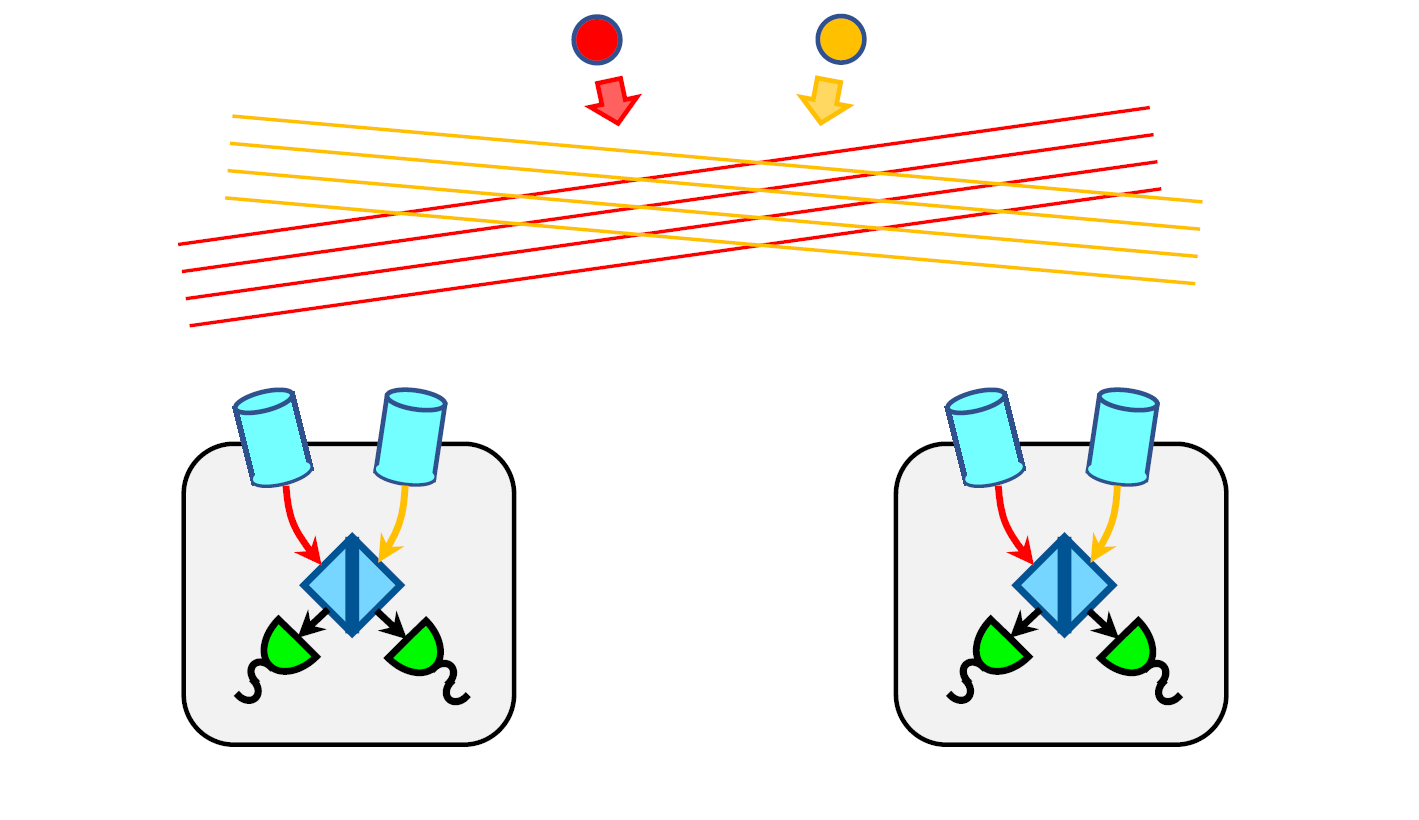
Paul StankusBrookhaven Science Associates  The scientific goal is to enable a new method for observing gravitational waves at low frequencies, based on the astrometric GW signature — gravitational waves passing by the Earth will cause a (very small) coordinated apparent motion of all sky objects. Our innovation is to deploy a new approach to precision […]
NASA··1 min read
Zero-Day
↘2K
💬
Top Discussion
HN
Hacker News
“GPT-5.5's API pricing is reshaping how startups build AI products”