Posted by Kosuke Suzuki – Director, Games on Google Play On July 1, Amazing Seasun Games is set to unveil its highly anticipated action shooting game - Mecha BREAK , with a multiplatform launch across PC and Console. A key to their PC growth strategy is Google Play Games on PC , enabling the team to build excitement with a pre-registration campaign, maximize revenue with PC earnback, and ensure a secure, top-tier experience on PC. Building momentum with pre-registration With a legacy of creating high-quality games since 1995, Amazing Seasun Games has already seen Mecha BREAK attract over 3.5 million players during the last beta test. To build on this momentum, the studio is bringing their game to Google Play Games on PC to open pre-registration and connect with its massive player audience. "We were excited to launch on Google Play Games on PC. We want to make sure all players can enjoy the Mecha BREAK experience worldwide." - Kris Kwok, Executive Producer of Mecha BREAK and CEO of Amazing Seasun Games Mecha BREAK pre-registration on Google Play Games on PC homepage Accelerating growth with the Native PC program Mecha BREAK 's launch strategy includes leveraging the native PC earnback , a program that gives native PC
developers
the opportunity to unlock up to 15% in additional earnback. Beyond earnback, the program offers comprehensive support for PC game development, distribution, and growth.
Developers
can manage PC builds in Play Console, simplifying the process of packaging PC versions, configuring releases, and managing store listings. Now, you can also view PC-specific sales reports, providing a more precise analysis of your game's financial performance. Delivering a secure and high quality PC experience Mecha BREAK is designed to deliver an intense and high-fidelity experience on PC. Built on a cutting-edge, proprietary 3D engine, the game offers players three unique modes of fast-paced combat on land and in the air. Diverse combat styles: Engage in six-on-six hero battles, three-on-three matches, or the unique PvPvE extraction mode "Mashmak". Free customization options: Create personalized characters with a vast array of colors, patterns and gameplay styles, from close-quarters brawlers to long-range tactical units. Mecha BREAK offers a high-fidelity experience on PC The decision to integrate with
Google
Play Games on PC was driven by the platform's robust security infrastructure, including tools such as Play Integrity API , supporting large-scale global games like Mecha BREAK . "Mecha BREAK’s multiplayer setting made
Google
Play Games a strong choice, as we expect exceptional operational stability and performance. The platform also offers advanced malware protection and anti-cheat capabilities." - Kris Kwok, Executive Producer of Mecha BREAK and CEO of Amazing Seasun Games Bring your game to
Google
Play Games on PC This year, the native PC program is open to all PC games, including PC-only titles. If you're ready to expand your game's reach and accelerate its growth, learn more about the eligibility requirements and how to join the program today.
Right now, we’re forcing AI into development without thinking long and hard about the implications. From ethical blind spots to broken career ladders, the future of game development might not be faster, just riskier.
Posted by Naheed Vora – Senior Product Manager, Android App Safety Making it easier for you to build safer apps from the start We understand you want clear Play policy guidance early in your development, so you can focus on building amazing experiences and prevent unexpected delays from disrupting launch plans. That’s why we’re making it easier to have smoother app publishing experiences, from the moment you start coding . With Play Policy Insights beta in Android Studio, you’ll get richer, in-context guidance on policies that may impact your app through lint warnings. You’ll see policy summaries, dos and don'ts to avoid common pitfalls, and direct links to details. We hope you caught an early demo at I/O . And now, you can check out Play Policy Insights beta in the Android Studio Narwhal Feature Drop Canary release . Play Policy Insights beta in Android Studio shows rich, in-context guidance How to use Play Policy Insights beta in Android Studio Lint warnings will pop up as you code, like when you add a permission. For example, if you add an Android API that uses Photos and requires READ_MEDIA_IMAGES permission, then the Photos & Video Insights lint warning will appear under the respective API call line item in Android Studio. You can also get these insights by going to Code > Inspect for Play Policy Insights and selecting the project scope to analyze. The scope can be set to the whole project, the current module or file, or a custom scope . Get Play Policy Insights beta for the whole project, the current module or file, or a custom scope and see the results along with details for each insights in the Problems tool window. In addition to seeing these insights in Android Studio, you can also generate them as part of your Continuous Integration process by adding the following dependency to your project. Kotlin lintChecks( "com.google.play.policy.insights:insights-lint:<version>" ) Groovy lintChecks 'com.google.play.policy.insights:insights-lint:<version>' Share your feedback on Play Policy Insights beta We’re actively working on this feature and want your feedback to refine it before releasing it in the Stable channel of Android Studio later this year. Try it out, report issues , and stop by the Google Play Developer Help Community to share your questions and thoughts directly with our team. Join us on June 16 when we answer your questions. We’d love to hear about: How will this change your current Android app development and Google Play Store submission workflow? Which was more helpful in addressing issues: lint warnings in the IDE or lint warnings from CI build? What was most helpful in the policy guidance, and what could be improved? Developers have told us they like: Catching potential Google Play policy issues early, right in their code, so they can build more efficiently. Seeing potential Google Play policy issues and guidance all in one-place, reducing the need to dig through policy announcements and issue emails. Easily discussing potential issues with their team, now that everyone has shared information. Continuously checking for potential policy issues as they add new features, gaining confidence in a smoother launch. For more, see our Google Play Help Center article or Android Studio preview release notes . We hope features like this will help give you a better policy experience and more streamlined development.
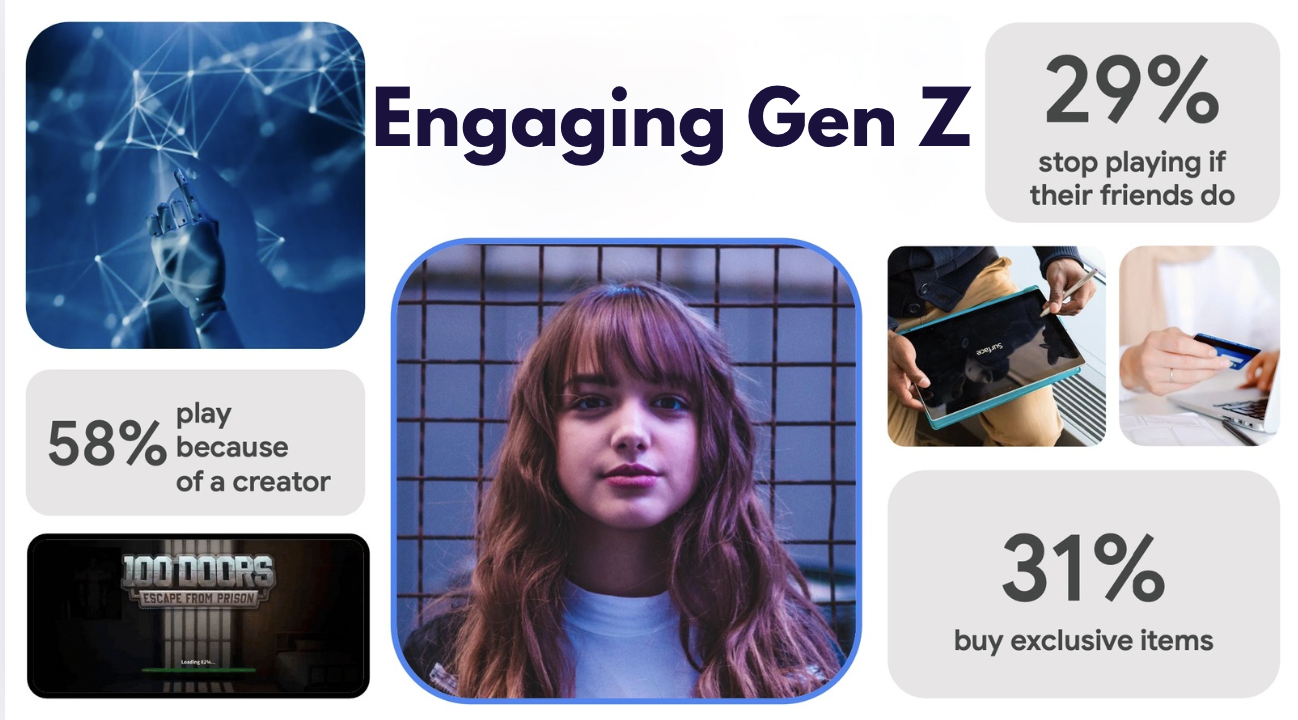
By 2026, Gen Z will be the biggest spenders in gaming. But winning them over takes more than a good game—it takes creators, social ecosystems, and seamless cross-platform play. Here’s how to stay ahead.
Mobile gaming is getting more dramatic—literally. With games like Dark War: Survival proving that players don’t just want new mechanics, they want high-stakes stories that pull them in.
2025 is going to be a wild year for consumer apps. From TikTok’s survival saga to AI-driven personal finance apps and the rebirth of super apps, here’s what we think will shake up the market and reshape how we connect, spend, and engage.
Summer holidays might be over, but fans of Gunship Battle: Total Warfare are still in for a treat as Joycity … Continue reading "‘Gunship Battle: Total Warfare’ Launches Massive Sky Ace Update"
Action adventure game RWBY: Arrowfell from WayForward is now available on mobile through the Crunchyroll Game Vault. RWBY: Arrowfell, developed … Continue reading "‘RWBY: Arrowfell’ Now Available on Mobile Through Crunchyroll Game Vault"
At Anime NYC this weekend, Aniplex USA shared more details for its upcoming 3D action RPG Alterna Vvelt: Blue Exorcist … Continue reading "3D Action RPG ‘Alterna Vvelt: Blue Exorcist Another Story’ From Aniplex Gets a New Trailer Ahead of Its Launch on Mobile and PC"
TouchArcade··1 min read
Zero-Day
↘2K
💬
Top Discussion
HN
Hacker News
“GPT-5.5's API pricing is reshaping how startups build AI products”