Starting next month, Apple will change the supported algorithms that secure server connections for Apple Pay on the Web. In order to maintain uninterrupted service, you’ll need to ensure that your production servers support one or more of the designated six ciphers before February 4, 2025. These algorithm changes will affect any secure connection you’ve established as part of your Apple Pay integration, including the following touchpoints: Requesting an Apple Pay payment session (Apple Pay on the Web only) Renewing your domain verification (Apple Pay on the Web only) Receiving and handling merchant token notifications for recurring, deferred, and automatic-reload transactions (Apple Pay on the Web and in app) Creating and updating Wallet Orders (Apple Pay on the Web and in app) Managing merchant onboarding via the Apple Pay Web Merchant Registration API (payment service provider (PSP) and e-commerce platforms only)
In the first edition of the new year: Bring SwiftUI to your app in Cupertino, get ready for the Swift Student Challenge, meet the team behind Oko , and more. Read the full article
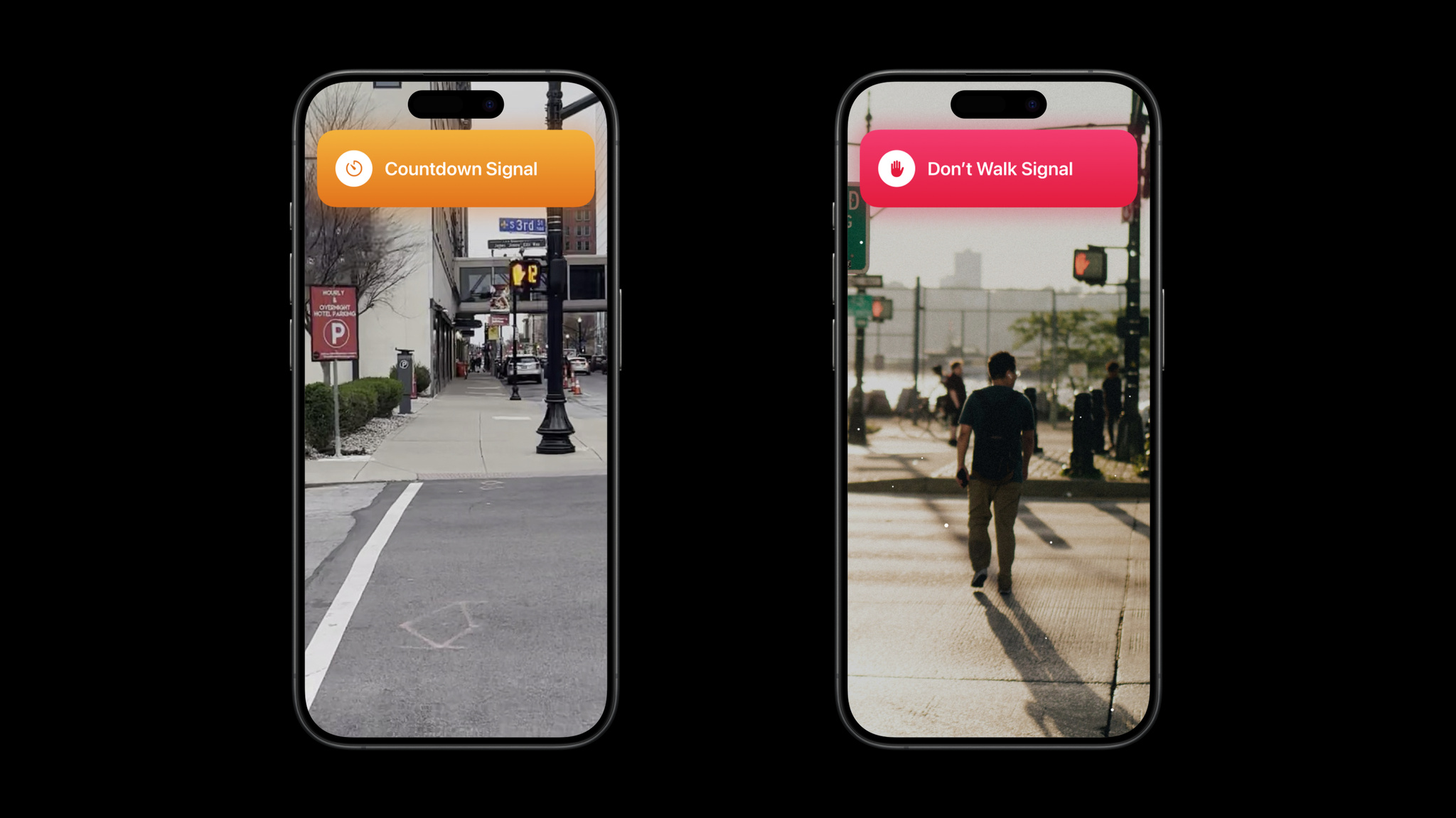
Oko is a testament to the power of simplicity. The 2024 Apple Design Award winner for Inclusivity and 2024 App Store Award winner for Cultural Impact leverages Artificial Intelligence to help blind or low-vision people navigate pedestrian walkways by alerting them to the state of signals — “Walk,” “Don’t Walk,” and the like — through haptic, audio, and visual feedback. The app instantly affords more confidence to its users. Its bare-bones UI masks a powerful blend of visual and AI tools under the hood. And it’s an especially impressive achievement for a team that had no iOS or Swift development experience before launch. “The biggest feedback we get is, ‘It’s so simple, there’s nothing complex about it,’ and that’s great to hear,” says Vincent Janssen, one of Oko ’s three Belgium-based founders. “But we designed it that way because that’s what we knew how to do. It just happened to also be the right thing.” ADA FACT SHEET From left: Willem Van de Mierop, Michiel Janssen, and Vincent Janssen are the three cofounders of Oko . The app’s name means “eye.” Oko Winner: Inclusivity Team: AYES BV Available on: iPhone Team size: 6 Previous accolades: 2024 App Store Award winner for Cultural Impact; App Store Editors’ Choice Learn more about Oko Download Oko from the App Store For Janssen and his cofounders, brother Michiel and longtime friend Willem Van de Mierop, Oko — the name translates to “eye” — was a passion project that came about during the pandemic. All three studied computer science with a concentration in AI, and had spent years working in their hometown of Antwerp. But by the beginning of 2021, the trio felt restless. “We all had full-time jobs,” says Janssen, “but the weekends were pretty boring.” Yet they knew their experience couldn’t compare to that of a longtime friend with low vision, who Janssen noticed was feeling more affected as the autumn and winter months went on. “We really started to notice that he was feeling isolated more than others,” says Janssen. “Here in Belgium, we were allowed to go for walks, but you had to be alone or with your household. That meant he couldn’t go with a volunteer or guide. As AI engineers, that got us thinking, ‘Well, there are all these stories about autonomous vehicles. Could we come up with a similar system of images or videos that would help people find their way around public spaces?’” I had maybe opened Xcode three times a few years before, but otherwise none of us had any iOS or Swift experience. Vincent Janssen, Oko founder The trio began building a prototype that consisted of a microcomputer, 3D-printed materials, and a small portable speaker borrowed from the Janssen brothers’ father. Today, Janssen calls it “hacky hardware,” something akin to a small computer with a camera. But it allowed the team and their friend — now their primary tester — to walk the idea around and poke at the technology’s potential. Could AI recognize the state of a pedestrian signal? How far away could it detect a Don’t Walk sign? How would it perform in rain or wind or snow? There was just one way to know. “We went out for long walks,” says Janssen. And while the AI and hardware performed well in their road tests, issues arose around the hardware’s size and usability, and the team begin to realize that software offered a better solution. The fact that none of the three had the slightest experience building iOS apps was simply a hurdle to clear. “I had maybe opened Xcode three times a few years before,” says Janssen, “but otherwise none of us had any iOS or Swift experience.” Oko helps people navigate pedestrian walkways through interactive maps and audio, visual, and haptic feedback. So that summer, the team pivoted to software, quitting their full-time jobs and throwing themselves into learning Swift through tutorials, videos, and trusty web searches. The core idea crystallized quickly: Build a simple app that relied on Camera, the Maps SDK, and a powerful AI algorithm that could help people get around town. “Today, it’s a little more complex, but in the beginning the app basically opened up a camera feed and a Core ML model to process the images,” says Janssen, noting that the original model was brought over from Python. “Luckily, the tools made the conversion really smooth.” ( Oko ’s AI models run locally on device.) With the software taking shape, more field testing was needed. The team reached out to accessibility-oriented organizations throughout Belgium, drafting a team of 100 or so testers to “codevelop the app,” says Janssen. Among the initial feedback: Though Oko was originally designed to be used in landscape mode, pretty much everyone preferred holding their phones in portrait mode. “I had the same experience, to be honest,” said Janssen, “but that meant we needed to redesign the whole thing.” The Oko team navigates through prototypes at a review session in their hometown of Antwerp, Belgium. Other changes included amending the audio feedback to more closely mimic existing real-world sounds, and addressing requests to add more visual feedback. The experience amounted to getting a real-world education about accessibility on the fly. “We found ourselves learning about VoiceOver and haptic feedback very quickly,” says Janssen. Still, the project went remarkably fast — Oko launched on the App Store in December 2021, not even a year after the trio conceived of it. “It took a little while to do things, like make sure the UI wasn’t blocked, especially since we didn’t fully understand the code we wrote in Swift,” laughs Janssen, “but in the end, the app was doing what it needed to do.” We found ourselves learning about VoiceOver and haptic feedback. Vincent Janssen, Oko founder The accessibility community took notice. And in the following months, the Oko team continued expanding its reach — Michiel Janssen and Van de Mierop traveled to the U.S. to meet with accessibility organizations and get firsthand experience with American street traffic and pedestrian patterns. But even as the app expanded, the team retained its focus on simplicity. In fact, Janssen says, they explored and eventually jettisoned some expansion ideas — including one designed to help people find and board public transportation — that made the app feel a little too complex. Today, the Oko team numbers 6, including a fleet of developers who handle more advanced Swift matters. “About a year after we launched, we got feedback about extra features and speed improvements, and needed to find people who were better at Swift than we are,” laughs Janssen. At the same time, the original trio is now learning about business, marketing, and expansion. At its core, Oko remains a sparkling example of a simple app that completes its task well. “It’s still a work in progress, and we’re learning every day,” says Janssen. In other words, there are many roads yet to cross. Meet the 2024 Apple Design Award winners Behind the Design is a series that explores design practices and philosophies from finalists and winners of the Apple Design Awards. In each story, we go behind the screens with the developers and designers of these award-winning apps and games to discover how they brought their remarkable creations to life.
The busiest season on the App Store is almost here. Make sure your apps and games are up to date and ready. App Review will continue to accept submissions throughout the holiday season. Please plan to submit time-sensitive submissions early, as we anticipate high volume and reviews may take longer to complete from December 20-26. Learn more about submitting to the App Store
The App Store is designed to make it easy to sell your digital goods and services globally, with support for 44 currencies across 175 storefronts. From time to time, we may need to adjust prices or your proceeds due to changes in tax regulations or foreign exchange rates. These adjustments are made using publicly available exchange rate information from financial data providers to help make sure prices for apps and In-App Purchases stay consistent across all storefronts. Tax updates as of October: Your proceeds from the sale of eligible apps and In‑App Purchases have been increased in: Nepal: Apple no longer remits Nepal value-added tax (VAT) for local developers and proceeds were increased accordingly. Kazakhstan: Apple no longer remits Kazakstan VAT for local developers and proceeds were increased accordingly. Madeira: Decrease of the Madeira VAT rate from 5% to 4% for news publications, magazines and other periodicals, books, and audiobooks. Exhibit B of the Paid Applications Agreement has been updated to indicate that Apple will not remit VAT in Nepal and Kazakhstan for local developers. Learn more about your proceeds View payments and proceeds Download financial reports Price updates as of December 2: Pricing for apps and In-App Purchases will be updated for the Japan and Türkiye storefronts if you haven’t selected one of these as the base for your app or In‑App Purchases. If you’ve selected the Japan or Türkiye storefront as the base for your app or In-App Purchase, prices won’t change. On other storefronts, prices will be updated to maintain equalization with your chosen base price. Prices won’t change in any region if your In‑App Purchase is an auto‑renewable subscription and won’t change on the storefronts where you manually manage prices instead of using the automated equalized prices. The Pricing and Availability section of Apps has been updated in App Store Connect to display these upcoming price changes. As always, you can change the prices of your apps, In‑App Purchases, and auto‑renewable subscriptions at any time. Learn more about managing your prices View or edit upcoming price changes Edit your app’s base country or region Pricing and availability start times by country or region Set a price for an In-App Purchase
Share your app or game’s upcoming content and enhancements for App Store featuring consideration with new Featuring Nominations in App Store Connect. Submit a nomination to tell our team about a new launch, in-app content, or added functionality. If you’re featured in select placements on the Today tab, you’ll also receive a notification via the App Store Connect app. In addition, you can promote your app or game’s biggest moments — such as an app launch, new version, or select featuring placements on the App Store — with readymade marketing assets. Use the App Store Connect app to generate Apple-designed assets and share them to your social media channels. Include the provided link alongside your assets so people can easily download your app or game on the App Store. Learn more about getting featured Submit a Featuring Nomination
The Push Notifications Console now includes metrics for broadcast push notifications sent in the Apple Push Notification service (APNs) production environment. The console’s interface provides an aggregated view of the broadcast push notifications that are successfully accepted by APNs, the number of devices that receive them, and a snapshot of the maximum number of devices subscribed to your channels. Set up broadcast push notifications Broadcast updates to your Live Activities
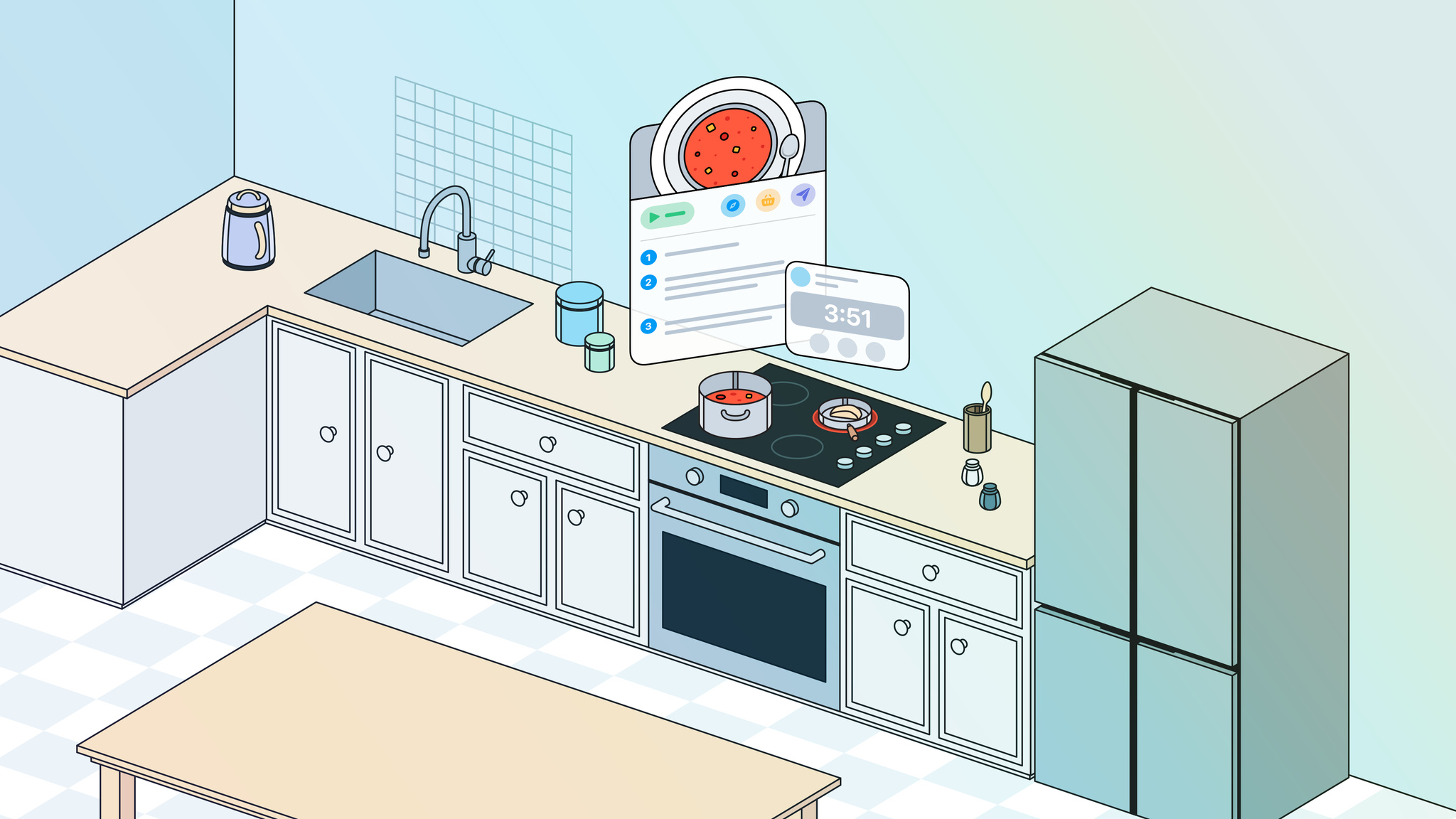
Let’s get this out of the way: Yes, Devin Davies is an excellent cook. “I’m not, like, a professional or anything,” he says, in the way that people say they’re not good at something when they are. But in addition to knowing his way around the kitchen, Davies is also a seasoned developer whose app Crouton , a Swift-built cooking aid, won him the 2024 Apple Design Award for Interaction. Crouton is part recipe manager, part exceptionally organized kitchen assistant. For starters, the app collects recipes from wherever people find them — blogs, family cookbooks, scribbled scraps from the ’90s, wherever — and uses tasty ML models to import and organize them. “If you find something online, just hit the Share button to pull it into Crouton ,” says the New Zealand-based developer. “If you find a recipe in an old book, just snap a picture to save it.” And when it’s time to start cooking, Crouton reduces everything to the basics by displaying only the current step, ingredients, and measurements (including conversions). There’s no swiping around between apps to figure out how many fl oz are in a cup; no setting a timer in a different app. It’s all handled right in Crouton . “The key for me is: How quickly can I get you back to preparing the meal, rather than reading?” Davies says. ADA FACT SHEET Crouton Winner: Interaction Available on: iPhone, iPad, Mac, Apple Vision Pro, Apple Watch Team size: 1 Learn more about Crouton Download Crouton from the App Store Crouton is the classic case of a developer whipping up something he needed. As the de facto chef in the house, Davies had previously done his meal planning in the Notes app, which worked until, as he laughs, “it got a little out of hand.” At the time, Davies was in his salad days as an iOS developer, so he figured he could build something that would save him a little time. (It’s in his blood: Davies’s father is a developer too.) "Programming was never my strong suit,” he says, “but once I started building something that solved a problem, I started thinking of programming as a means to an end, and that helped.” Davies’s full-time job was his meal ticket, but he started teaching himself Swift on the side. Swift, he says, clicked a lot faster than the other languages he’d tried, especially as someone who was still developing a taste for programming. “It still took me a while to get my head into it,” he says, “but I found pretty early on that Swift worked the way I wanted a language to work. You can point Crouton at some text, import that text, and do something with it. The amount of steps you don’t have to think about is astounding.” I found pretty early on that Swift worked the way I wanted a language to work. Devin Davies, Crouton Coding with Swift offered plenty of baked-in benefits. Davies leaned on platform conventions to make navigating Crouton familiar and easy. Lists and collection views took advantage of Camera APIs. VisionKit powered text recognition; a separate model organized imported ingredients by category. “I could separate out a roughly chopped onion from a regular onion and then add the quantity using a Core ML model,” he says. “It’s amazing how someone like me can build a model to detect ingredients when I really have zero understanding of how it works.” Davies designed Crouton with simplicity in mind at all times. “I spent a lot of time figuring out what to leave out rather than bring in,” he says. The app came together quickly: The first version was done in about six months, but Crouton simmered for a while before finding its audience. “My mom and I were the main active users for maybe a year,” Davies laughs. “But it’s really important to build something that you use yourself — especially when you’re an indie — so there’s motivation to carry on.” Davies served up Crouton updates for a few years, and eventually the app gained more traction, culminating with its Apple Design Award for Interaction at WWDC24. That’s an appropriate category, Davies says, because he believes his approach to interaction is his app’s special sauce. “My skillset is figuring out how the pieces of an app fit together, and how you move through them from point A to B to C,” he says. “I spent a lot of time figuring out what to leave out rather than bring in.” Crouton recipes can be imported from blogs, cookbook, scraps of paper, or anywhere else they might be found. Davies hopes to use the coming months to explore spicing up Crouton with Apple Intelligence, Live Activities on Apple Watch, and translation APIs. (Though Crouton is his primary app, he’s also built an Apple Vision Pro app called Plate Smash , which is presumably very useful for cooking stress relief.) But it’s important to him that any new features or upgrades pair nicely with the current Crouton . “I’m a big believer in starting out with core intentions and holding true to them,” he says. “I don’t think that the interface, over time, has to be completely different.” My skillset is figuring out how the pieces of an app fit together, and how you move through them from point A to B to C. Devin Davies, Crouton Because it’s a kitchen assistant, Crouton is a very personal app. It’s in someone’s kitchen at mealtime, it’s helping people prepare means for their loved ones, it’s enabling them to expand their culinary reach. It makes a direct impact on a person’s day. That’s a lot of influence to have as an app developer — even when a recipe doesn’t quite pan out. “Sometimes I’ll hear from people who discover a bug, or even a kind of misunderstanding, but they’re always very kind about it,” laughs Davies. “They’ll tell me, ‘Oh, I was baking a cake for my daughter’s birthday, and I put in way too much cream cheese and I ruined it. But, great app!’” Meet the 2024 Apple Design Award winners Behind the Design is a series that explores design practices and philosophies from finalists and winners of the Apple Design Awards. In each story, we go behind the screens with the developers and designers of these award-winning apps and games to discover how they brought their remarkable creations to life.
In this edition: The Swift Pathway, new developer activities around the world, and an interview with the creator of recipe app Crouton . Read the full article
As part of ongoing efforts to improve security and privacy on Apple platforms, the App Store receipt signing intermediate certificate is being updated to use the SHA-256 cryptographic algorithm. This certificate is used to sign App Store receipts, which are the proof of purchase for apps and In-App Purchases. This update is being completed in multiple phases and some existing apps on the App Store may be impacted by the next update, depending on how they verify receipts. Starting January 24, 2025 , if your app performs on-device receipt validation and doesn't support a SHA-256 algorithm, your app will fail to validate the receipt. If your app prevents customers from accessing the app or premium content when receipt validation fails, your customers may lose access to their content. If your app performs on-device receipt validation, update your app to support certificates that use the SHA-256 algorithm; alternatively, use the AppTransaction and Transaction APIs to verify App Store transactions. For more details, view TN3138: Handling App Store receipt signing certificate change .
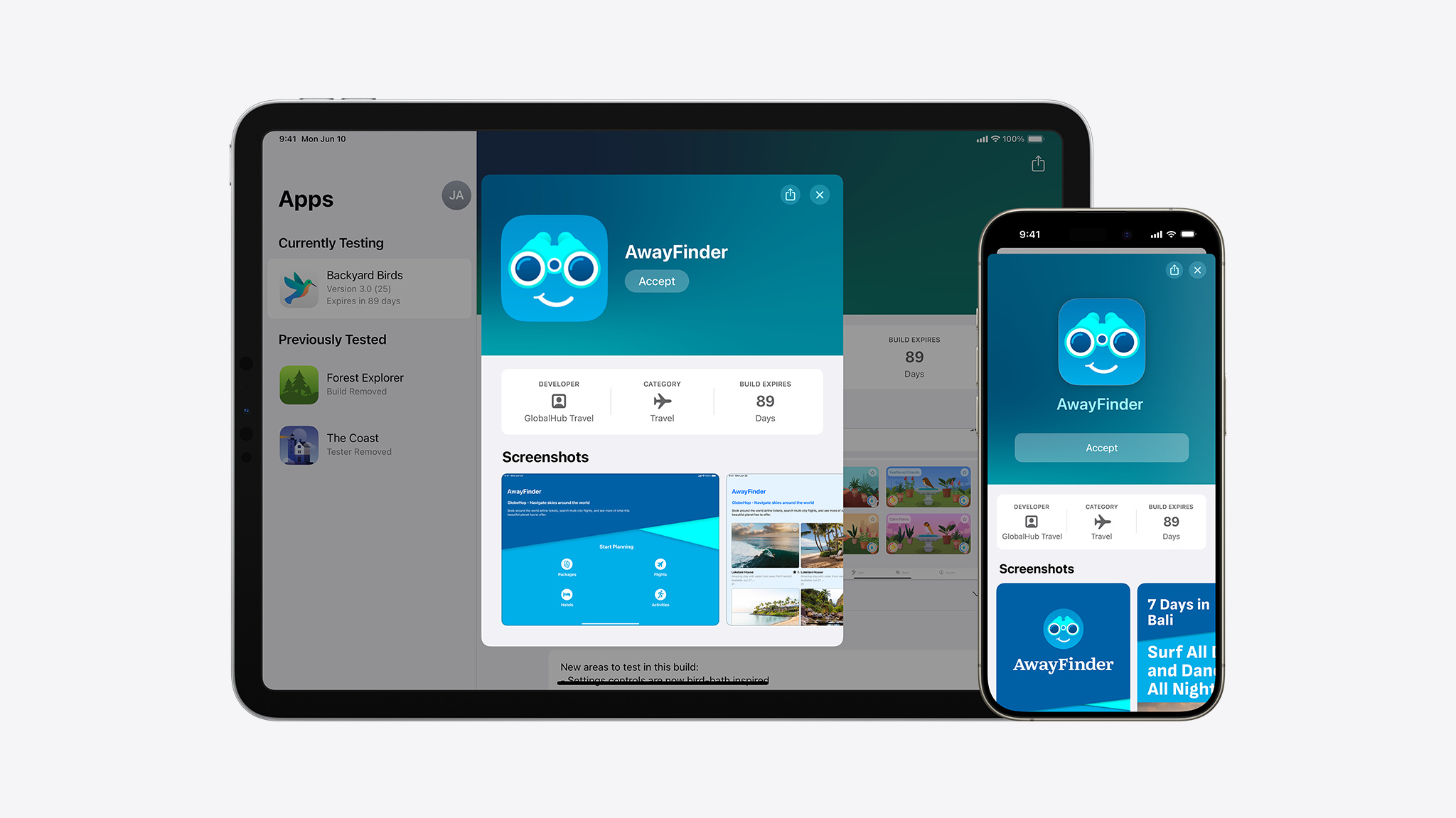
Beta testing your apps, games, and App Clips is even better with new enhancements to TestFlight. Updates include: Redesigned invitations. TestFlight invitations now include your beta app description to better highlight new features and content your app or game offers to prospective testers. Apps and games with an approved version that’s ready for distribution can also include their screenshots and app category in their invite. We’ve also added a way for people to leave feedback if they didn’t join your beta, so you can understand why they didn’t participate. Tester enrollment criteria. You can choose to set criteria , such as device type and OS versions, to more easily enroll qualified testers via a public link to provide more relevant feedback on your invite. Public link metrics. Find out how successful your public link is at enrolling testers for your app with new metrics . Understand how many testers viewed your invite in the TestFlight app and chose to accept it. If you’ve set criteria for the public link, you can also view how many testers didn’t meet the criteria. To get started with TestFlight, upload your build, add test information, and invite testers. Learn more about TestFlight
Apple Developer News··1 min read
Zero-Day
↘2K
💬
Top Discussion
HN
Hacker News
“GPT-5.5's API pricing is reshaping how startups build AI products”